
If you have an iPhone that you can’t get into because you fucked up with the passcode, and locked out the phone, then it is not the end of the world – there is a way out = reset to factory settings using iTunes.
Its pretty simple – all you need is the usb charging cable and iTunes installed on your machine. This article is about resetting an iPhone 5s to factory settings using recovery mode.
Step1: hold the power button down and shut down your iPhone, but leave it connected to your computer via usb (still disconnected from iTunes)
Step2: open iTunes on your pc/mac
Step3: press and hold the power and home button until the iPhone restarts to recovery mode. You can tell this by looking at the screen which will look like the image below
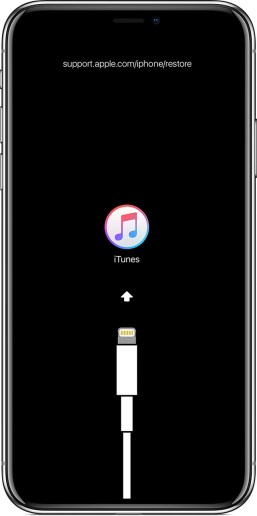
Note: force restart method varies on different iPhone. This method is for iPhone 5s.
Step4: on your iTunes, you should get a pop-up similar to the image below.
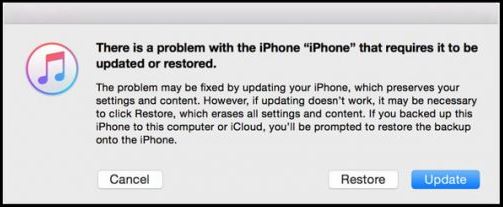
Step5: you click on ‘Restore’, and the iphone would then try to contact apple, download the latest OS, and install on to your phone.
Step6: once done, your phone will restart into a brand new operating system and settings, and prompt you to set it up like you did the first time.
In my case, the first time i tried, I did get an error message saying the iPhone was locked and hence it could not attempt to restore. I just tried again, and it worked.
 The Dumb Coder